A security-hardened, de-clouded, open-source Asuswrt-Merlin fork for eight ASUS Wi-Fi 7 models:
the RT-BE86U, RT-BE88U, RT-BE96U, GT-BE98, GT-BE98 Pro and
GT-BE19000 routers, and the ZenWiFi BQ16 and
BQ16 Pro mesh systems. Reaper keeps the familiar Merlin foundation while adding
deeper security controls, hardware-accelerated QoS, network visibility, diagnostics,
privacy-focused defaults, and a purpose-built administration experience.
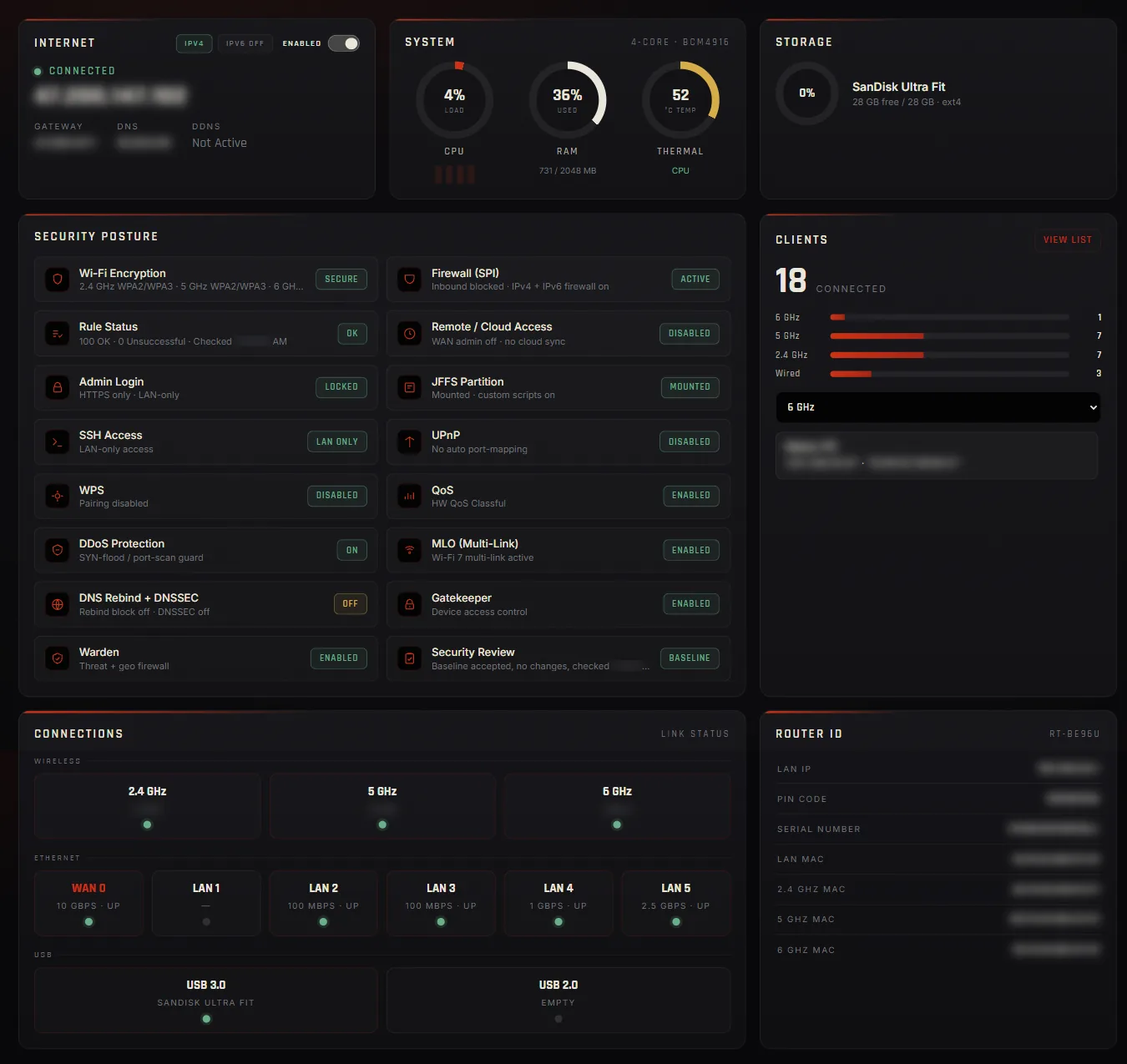
Reaper administration dashboardDark UI · Local control
839
PatchesA numbered, public series on Asuswrt-Merlin 3006.102.8. Every one is in the repository.
8
ModelsOne Broadcom BCM4916 platform, one patch series, two build variants each.
25
Language packsEvery Reaper page ships translated, in lockstep with the English text.
0
Secrets, control servers, telemetryBuilt in a public clean room. The router reports to no one.
Stablev3.2.3The release channel · both variants
The newest image you can install without opting into a beta, and what the router's own update
check reads. It brings the whole 3.0 and 3.1 lines to stable: OpenSSL 3.5 under every TLS path,
passphrase-sealed backups, the firewall's Rule Status self-check, a DNS failover health check,
one Wireless Settings tab, a native System Information page, and Policy Routing that reads top
to bottom.
The GT-BE19000, BQ16 and BQ16 Pro are standard targets whose first stable image arrives with the
next stable release. Until then, their newest image is on the beta channel.
Betav3.4.7-betaNew rungs publish as prereleases first
Everything after v3.2.3, on all eight models. The router's own update check offers it only with the Beta Channel switch on. Read the release notes and keep a recovery path before you flash it.
An opt-in security review that reports changes to scripts, cron, SSH keys and exposure settings against a baseline you accept; Warden can answer threat domains with NXDOMAIN.
AiMesh with Reaper on every node: a Reaper main router, Reaper routers as nodes, and a channel picker that follows the nodes.
IPv6 across the firmware, WAN Ports in place of the Dual WAN tab, and Reaper's own Wi-Fi site survey.
OpenSSL 3.5.9, a one-box first-boot setup, preamble puncturing, and security fixes in pppd, strongSwan, Tor, lldpd, OpenVPN and the kernel.
Project status
The build-out is ending. Maintenance is next.
Reaper's development phase added what ASUS never shipped and grew the fleet from one router to
eight. That work is in its final stretch: the current beta rungs are mostly field fixes, hardening
and polish on features already in place. After that, Reaper moves to maintenance - fewer, steadier
releases that keep a finished firmware secure and current.
DoneBuild-outv1.0 → v3.2
Audit and hardening rounds, the native firewall and Rule Status, Warden, Gatekeeper, hardware QoS, and the Reaper pages.
NowFinal stretchv3.3 → v3.4
Eight models on one patch series, AiMesh with Reaper on every node, IPv6 throughout, and the fixes field testers report.
NextMaintenanceAfter the final stretch
A finished feature set, kept secure and carried forward onto new upstream releases for every supported model.
What drives a release in maintenance
No fixed schedule, support period or roadmap is promised: Reaper is independently maintained, and
the project says so plainly. A release ships when one of these happens.
A security findingA vulnerability in Reaper, or in the open-source userspace it carries, is fixed and shipped.
An Asuswrt-Merlin releaseUpstream changes that matter to Reaper are carried forward onto the patch series.
A new ASUS GPL dropApplicable vendor source is merged, so the closed radio parts stay current.
A fix Reaper cannot make itselfWhen upstream corrects a proprietary component, the fix is picked up for every model.
Why Reaper exists
Your router should work for you.
Reaper is built around a simple idea: infrastructure you own should remain understandable,
controllable, and defensible. It is not a replacement for the Asuswrt-Merlin foundation - it is a
focused fork that adds security hardening, visibility, and operational tooling for people who want
more control over the edge of their network.
⌁
Security hardening
Targeted fixes and defence-in-depth changes across the open-source userspace, with findings documented and changes compile-verified through the firmware build.
◌
Privacy and local control
Cloud-coupled features and unnecessary remote surface are reduced where practical, while management and diagnostics stay centred on the router and your LAN.
↯
Performance without blind spots
Hardware-accelerated QoS, connection inspection, traffic analytics, and practical diagnostics help tune the network without turning the router into a black box.
◇
Transparent engineering
The project publishes its patch series, build instructions, public build workflow, release documentation, source-availability details, and build provenance.
Reaper additions
More than a new theme.
The interface is intentionally different, but the deeper changes are functional: dedicated security
controls, traffic management, device policy, diagnostics, and operational tools integrated directly
into the firmware.
Security control
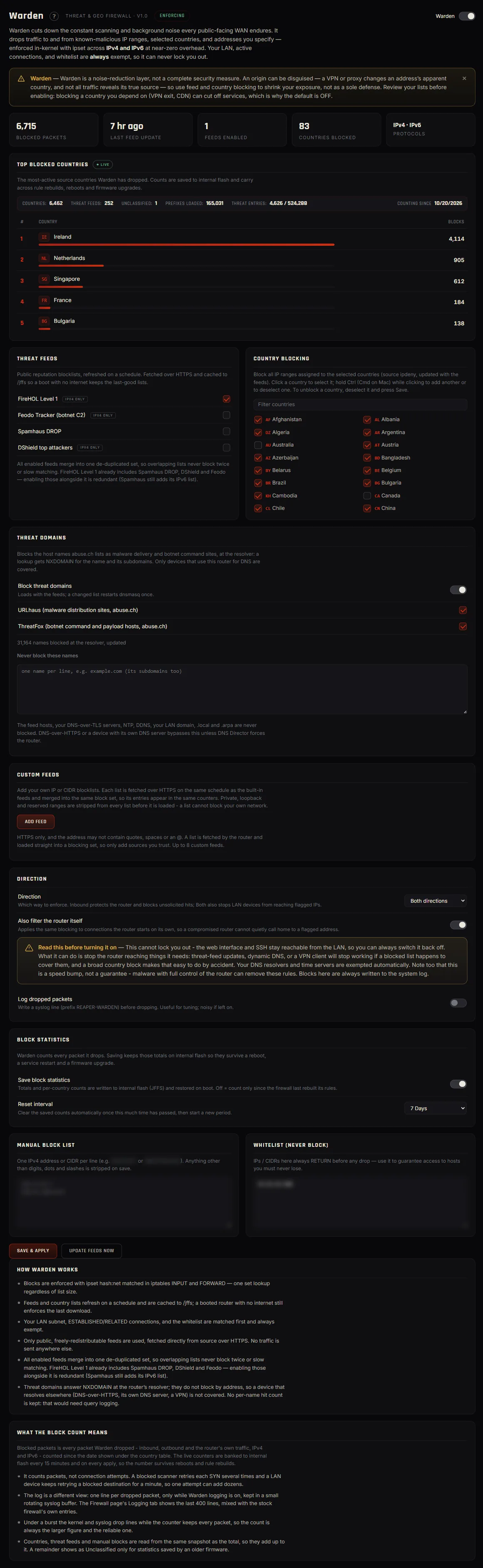
Reaper Warden
An opt-in threat and geographic firewall that consumes reputation feeds and your own lists, applies country policy on IPv4 and IPv6, keeps honest per-country block counts, and preserves an explicit anti-lockout rule. Opt-in threat domains answer host names from the URLhaus and ThreatFox malware lists with NXDOMAIN for every device that resolves through the router.
Supported hardware
Eight ASUS Wi-Fi 7 models. One platform, one patch series.
Every supported model is built on the Broadcom BCM4916, from the same numbered patch series, in
the same clean-room CI matrix, with both build variants. The RT-BE96U is the project's primary
development and physical-validation hardware; the other seven are built from per-model branches
of the same tree.
Flash only the image whose file name starts with your exact model - cross-flashing can brick the
unit. The GT-BE19000, BQ16 and BQ16 Pro get their first stable image with the next stable release;
until then, their newest image is on the beta channel. The RT-BE92U left the fleet at v3.1.2, now
that upstream Asuswrt-Merlin supports it; its last Reaper image stays downloadable.
Two build variants
Every model ships both. Choose the image that matches how you want to run the router.
AI Advisor / MCP Default release
Includes the optional Reaper AI Advisor/MCP capability. The service remains off until explicitly configured.
Standard / noMCP Alternate
All AI Advisor/MCP components are compiled out for users who want the smallest feature surface. The file name carries _noMCP.
Owner's guide
One guide. Every Reaper feature, explained.
The Reaper owner's guide is the single reference for installing, configuring, and running the
firmware. It is written for someone who will operate the router - technically literate, not a
developer - and it covers every Reaper page and switch: what it does, how to set it up, what to
expect, and the limits and gotchas the project has documented.
What the guide covers
What Reaper is, and is notWhat it keeps, removes, and adds; the two builds; the closed Broadcom parts.
Requirements and rulesAll eight models and the right file, flashing, the one-box first-boot setup, backups, JFFS, commit-confirm, custom scripts, the update check.
The dashboard and navigationCards, the left rail, tabs, overlays, and the theme switch.
Each feature pageFirewall, Rule Status and the security review, Gatekeeper, Warden, Policy Routing, QoS, Traffic Analyzer, Devices, Connections, Wireless Settings and Quality, Site Survey, WAN Ports, System Information, DNS Failover, Long-Term Storage, USB Disks, Backup & Restore, Diagnostics, Firmware, About, AI Advisor, and the Reaper switches.
Efficiency and good practiceHow to run it well day to day.
Troubleshooting, glossary, and defaultsA quick table, plain definitions, and exactly which stock defaults Reaper changes.
The rail and tabs below are laid out the way the Reaper shell lays them out, and every screen behind
them is a real capture of the page it names, taken on the project's own hardware with addresses and
identifiers blurred. Nothing here is interactive beyond navigation: pick a section, pick a tab, read
the screen, open it full size.
RT-BE96U REAPERPowered by Asuswrt-MerlinWAN ConnectedMode Wireless RouterFirmware 3006.102.8_Reaper_v3.4.7_BETAScreens 79Mock shell · real captures
Reaper is a public patch series applied to the public Asuswrt-Merlin source, and every published
image is compiled in a GitHub Actions clean room from pinned, public inputs. There is nothing in the
pipeline you cannot read, and nothing in the firmware that answers to anyone but you.
∅
No secrets
The build needs no private keys, tokens, SDK drops, or hidden inputs. Fork the repository, run the workflow, and you get the same image the project publishes - from the same source, on GitHub's own runners.
∅
No control servers
The ASUS cloud connector, account binding, AAE/AiHome tunnel, AiCloud, and every browser-side callback to vendor servers are removed. The build fails if a vendor CDN reference reaches the shipped web root.
∅
No telemetry
The router reports to no one. The only outbound check the firmware makes on its own is the opt-in update check against the Reaper GitHub release channel - and nothing is ever downloaded or installed automatically.
How the clean room works
Nothing about a Reaper release depends on the maintainer's machine. The public workflow rebuilds
the firmware from scratch on a fresh GitHub-hosted runner, and the provenance it prints is what
lets anyone check a published image against source.
Pinned public inputsThe upstream Asuswrt-Merlin tree, the public toolchains, and a stock Ubuntu container - every one pinned to an exact revision.
Fresh runner, every timeEach build starts from an empty GitHub-hosted runner. No cached state, no local box, no access to the project's repository required.
The patch series is applied in the openReaper's changes are a numbered patch series in the repository. The About page inside the firmware states the patch count, upstream commit, and build date of the image you are running.
Provenance you can checkThe workflow prints a timestamp-free staged-filesystem digest and verifies the source tree hash against the published manifest. Two builds of the same source produce the same digest.
Source, fixes, and provenance
Review the documented hardening work, the release history, and the provenance material that connects every published image back to source.
Everything Reaper adds is GPL v2, like the Merlin base it patches. The Broadcom radio drivers and a small set of vendor objects are proprietary, licensed for genuine ASUS hardware only, and shipped unmodified - the project lists them rather than pretending they are not there.
Every supported model has to be bought, flashed, bricked, and recovered on real hardware before a
release ships. If Reaper saved you time, you can help cover the bench.
Read first. Verify the model. Keep a recovery path.
Reaper is independently maintained third-party firmware. Before flashing, read the owner's guide,
review the current release notes, confirm your exact model, verify the hashes, and know the
rollback procedure.